Loading... Please wait...
Products
Products
- Home
- Artwork Guidelines
- Artwork Guidelines for Apparel and DTF Printing
Artwork Guidelines for Apparel and DTF Printing
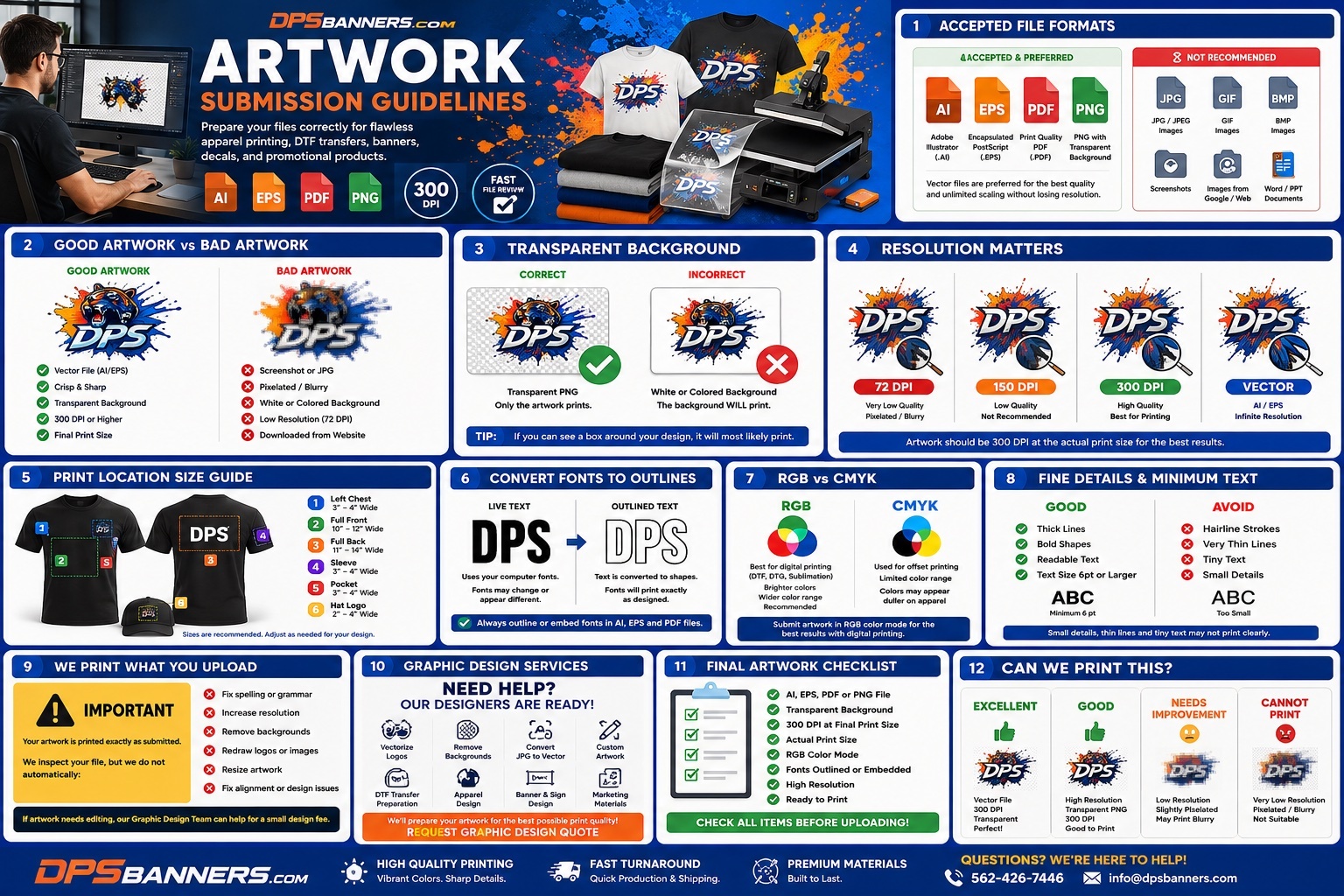
Artwork Submission Guidelines
Custom Apparel Printing & DTF Transfer Orders
To ensure the highest quality print results and the fastest turnaround, please review the following artwork requirements before submitting your files.
Preferred File Formats
For the best printing results, we recommend submitting artwork in one of the following formats:
Preferred (Best Quality)
- Adobe Illustrator (.AI)
- Encapsulated PostScript (.EPS)
- Print Quality PDF (.PDF)
Vector artwork is always preferred because it can be resized to any dimension without losing image quality.
Accepted Raster Files
- PNG (.PNG)
PNG files must include a transparent background unless the background is intentionally part of the design.
Resolution Requirements
Raster artwork (PNG) must be:
- 300 DPI (Pixels Per Inch)
- Created at the actual final print size
- Sharp and clear without pixelation
Important:
Simply increasing the DPI of a small image does not improve its quality. If your artwork is low resolution, it will print blurry or pixelated.
Example:
- 12" × 12" print = 3600 × 3600 pixels minimum
- 10" × 10" print = 3000 × 3000 pixels minimum
Transparent Background
For DTF Transfers and most apparel printing, artwork should have a transparent background.
Please do NOT submit:
- White backgrounds
- Colored boxes behind artwork
- Screenshots
- Images copied from websites
Unless specifically requested, only your artwork should print—not the background.
Fonts & Text
Whenever possible:
- Convert all fonts to outlines (Create Outlines)
- Embed fonts inside PDF files
- Avoid missing font substitutions
This ensures your design prints exactly as intended.
Color
For the most vibrant DTF prints:
- RGB color mode is preferred for digital apparel printing.
- Colors displayed on monitors may vary slightly from printed colors.
- Exact Pantone color matching is not guaranteed unless specifically requested.
Artwork Size
Please submit your artwork at the size you want it printed.
Examples:
- Left Chest: 3–4 inches wide
- Full Front: 10–12 inches wide
- Full Back: 11–14 inches wide
- Sleeve Print: 3–4 inches wide
If you're unsure, simply tell us the desired print location and we'll size it appropriately.
Fine Details
For best print quality:
- Avoid extremely thin lines
- Avoid tiny text smaller than 6 pt
- Small details may not reproduce clearly
Files We Do NOT Recommend
The following files often result in poor print quality:
- JPG/JPEG (unless very high resolution)
- GIF
- BMP
- Screenshots
- Social media images
- Images downloaded from websites
Copyright Notice
By submitting artwork, you confirm that you own the rights to reproduce the design or have permission from the copyright owner.
DPSBanners.com is not responsible for unauthorized use of copyrighted artwork.
Need Help?
Don't have print-ready artwork?
No problem!
Our in-house graphic design team can:
- Convert low-quality artwork into print-ready files
- Vectorize logos
- Remove image backgrounds
- Recreate missing artwork
- Prepare artwork for DTF printing
- Design custom graphics from scratch
Graphic design services are available for an additional fee.
Before You Upload, Double Check:
✅ AI, EPS, PDF or PNG
✅ Transparent Background
✅ 300 DPI at Final Print Size
✅ Fonts Converted to Outlines
✅ High Resolution Artwork
✅ No Screenshots or Web Images
✅ Correct Print Dimensions
Questions?
If you're unsure whether your artwork is print-ready, simply send us your file before placing your order. We'll gladly review it and let you know if any adjustments are needed.
DPSBanners.com
Professional Printing • Apparel • DTF Transfers • Banners • Displays